What to Do With the Box of Old Business Cards Sitting in Your Desk Drawer
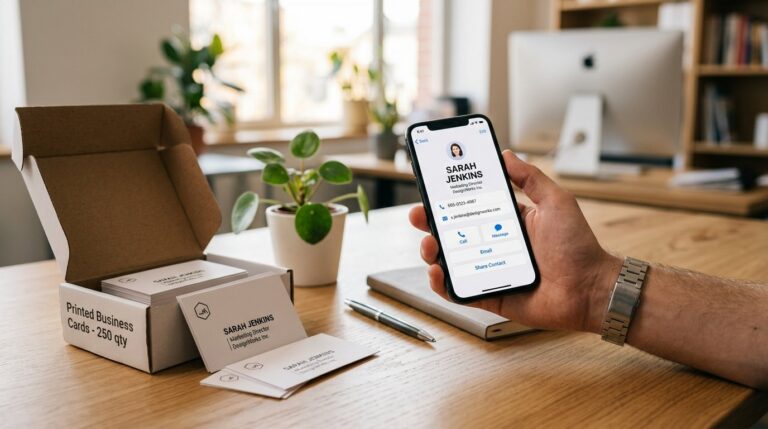
The box you ordered six months ago
You know the one. Four hundred cards, minimum print run, because the per-unit price drops off a cliff at 250. You used maybe forty of them. The rest are in a drawer, or a shelf, or the bottom of a conference bag. The phone number on them is current. The title is not. The email address still works, technically, but you changed roles eight months ago and nobody updated the template before the reprint.
Switching from paper to digital business cards is not a philosophical decision. It is a practical one, and the moment most people finally make it is when they open that box and do the maths on what they paid per card actually used.
This is not a post about why digital is better. It is about the awkward transition period — what to do with the stock you have, how to handle the contacts who still prefer paper, and how to start capturing the cards you receive without losing them to a pile on your desk.
Step one: stop reprinting, start updating
The single most defensible advantage of a digital card is this: when a detail changes, you update the profile and every link, QR code and NFC tap immediately reflects the new information. You do not reprint. You do not cross out a number with a pen and hand it over apologetically.
That alone is the reason most people who make the switch do not go back. If you have ever handed someone a card with a correction written on it, you already understand the argument.
So the first practical step is simple: stop ordering more paper cards. Run down the stock you have at events where it genuinely makes sense to hand them out, and in parallel, set up your digital card so it is ready to share the moment someone asks. You can run both for a while. Most people do.
Setting up a BONKT card takes under two minutes for the basics — name, title, contact details, a profile photo if you want one. The full feature set includes custom fields, video banners, portfolio items and a built-in email signature builder, but none of that is required on day one.
What to do with the cards you receive
Switching from paper to digital business cards is partly about what you hand out, and partly about what you do with the cards you collect. Most people have a system for this that they would charitably describe as “a pile.”
BONKT’s AI Paper Card Scanner is built for exactly this problem. Point your phone camera at a physical card and it reads the details, pulls out the relevant fields and saves the contact. The free tier includes three scans a month, which is enough to clear a modest backlog. If you are coming back from a conference with a stack of cards, it handles that too.
One thing worth knowing: the scanned images are processed by OpenAI as part of the AI extraction. That is disclosed in BONKT’s privacy policy, so it is not a surprise — but it is worth being aware of if you are scanning cards that carry sensitive details.
Once a contact is saved, it sits in the Contact Management Centre rather than a shoebox. You can add notes, track when you last connected, and pull up anyone’s details without digging through a stack.
The colleague who still hands out paper
Every team has one. They have been using the same card design since 2019, they order in bulk, and they regard the whole digital card conversation with the mild suspicion they reserve for anything that requires a software update.
The practical answer here is not to argue the point. It is to make the digital option frictionless enough that it becomes the path of least resistance.
When you share a BONKT card — by QR code, NFC tap, or a link sent over text — the person receiving it does not need to download anything. No app, no account, no BONKT subscription. They tap or scan, it opens in their browser, and they can save your details straight to their phone contacts in one tap. That is the part worth mentioning to the sceptical colleague: the other person never has to do anything unusual.
If you manage a team and want everyone on the same setup, the BONKT Pro plan covers one to forty-nine users at AUD $10.99 per user per month (GST inclusive), with bulk card creation and team management included. For fifty or more users, BONKT Unleashed is a flat AUD $384.45 per month (GST inclusive). There is also a free tier and a thirty-day trial of the full Pro feature set, with no payment details required to start.
Handling the contact who asks for a paper card
This one comes up more than people admit. You are at an industry event, you go to share your digital card, and the person across from you says: “Have you got a paper one?”
A few things are true here simultaneously. Some people genuinely prefer paper. Some are asking out of habit and will save your digital card without thinking twice once they see how it works. And some are at an age or in an industry where a QR code still feels slightly foreign.
The honest answer is: carry a small number of paper cards for the short term if your industry genuinely warrants it. Use them when the situation calls for it. But make sure the paper card points to your digital profile — a QR code printed on the card itself is a reasonable bridge, and it means even a paper handoff results in a saved digital contact if the recipient bothers to scan it.
The NFC card option from BONKT is worth considering here too. It looks and feels like a standard business card — available in plastic, bamboo, wood and metal — but a tap on a compatible phone opens your digital profile directly. You hand something physical over, they tap it, done. You can find the current range in the BONKT shop.
Switching from paper to digital business cards: the honest timeline
Most people do not flip a switch. The transition looks more like this:
Week one: set up a digital card, share it a few times, notice that it works. Week two through four: start using it as the default at meetings and events, keep a few paper cards in a jacket pocket for edge cases. Month two: the paper cards run out or get forgotten. Month three: you cannot remember why you were printing them.
The transition guide on the BONKT blog covers the setup side in more detail if you want a step-by-step walkthrough. The knowledge base has answers to most of the practical questions that come up once you are set up — custom URLs, email signature integration, QR code downloads and more.
The box in the drawer
You do not need to throw it out dramatically. Use the cards at the next event where it feels right, or leave them in the drawer until they are genuinely out of date. The point is not to make a statement about paper. The point is to stop being in a situation where you hand someone a card with a crossed-out phone number, or run out of cards at a conference, or lose a contact because their card ended up in a rental car.
Switching from paper to digital business cards is mostly just deciding to stop reprinting. Everything else follows from that.
If you want to see what the setup looks like, the free tier is a reasonable place to start — no credit card required, and your card is live in a few minutes. Create a free BONKT account here. For a full picture of what is included at each level, the benefits overview lays it out clearly.